

Enterprise Management Hub · v2.0.0 · Built by Zhaoxun
EMH Enterprise Management Hub
A one-stop cockpit for executives and PMOs: project, contract, opportunity, task, and strategic-goal data unified in a single dashboard, with a pluggable AI middleware that delivers insights, drafts weekly reports, and monitors risks end-to-end.
Product Overview · ENTERPRISE MANAGEMENT HUB
Five-Domain Data, Unified on One Screen
EMH (Enterprise Management Hub) is Zhaoxun's in-house enterprise management cockpit, built for executives, PMOs, and operations leaders. It brings scattered business data into a single cockpit where project, contract, opportunity, task, and strategic-goal data are unified and managed on one screen. Open the executive dashboard and KPIs, project health, AI insights, and the AI chat entry are all there together—no more last-minute report preparation before every review meeting.
Unlike traditional reporting tools, EMH embeds a layer of pluggable AI middleware on top of its tiered architecture: it reads five-domain data to generate structured project insights, answers questions on demand via SSE streaming chat, and, as a proactive Agent with built-in skill packs, drafts weekly reports, generates BD quotations, and keeps watch on project risks. Each AI capability can be enabled, swapped, or disabled on demand, and every AI conversation and audit is fully logged (ai_audit)—so leadership can use it with confidence.
The foundation is equally solid: a modern stack of Next.js 16 App Router + React 19 + TypeScript full-stack + Tailwind 4 + PostgreSQL 16; combined with RBAC permissions and a settings registry, global search, approval-flow instances, in-app zip backup/restore, and operations-grade full snapshots working as a dual-track safety net. A single Docker Compose command brings up four services, ready to publish across your LAN. With an embedded help center and a bilingual manual, rollout and training costs stay low.
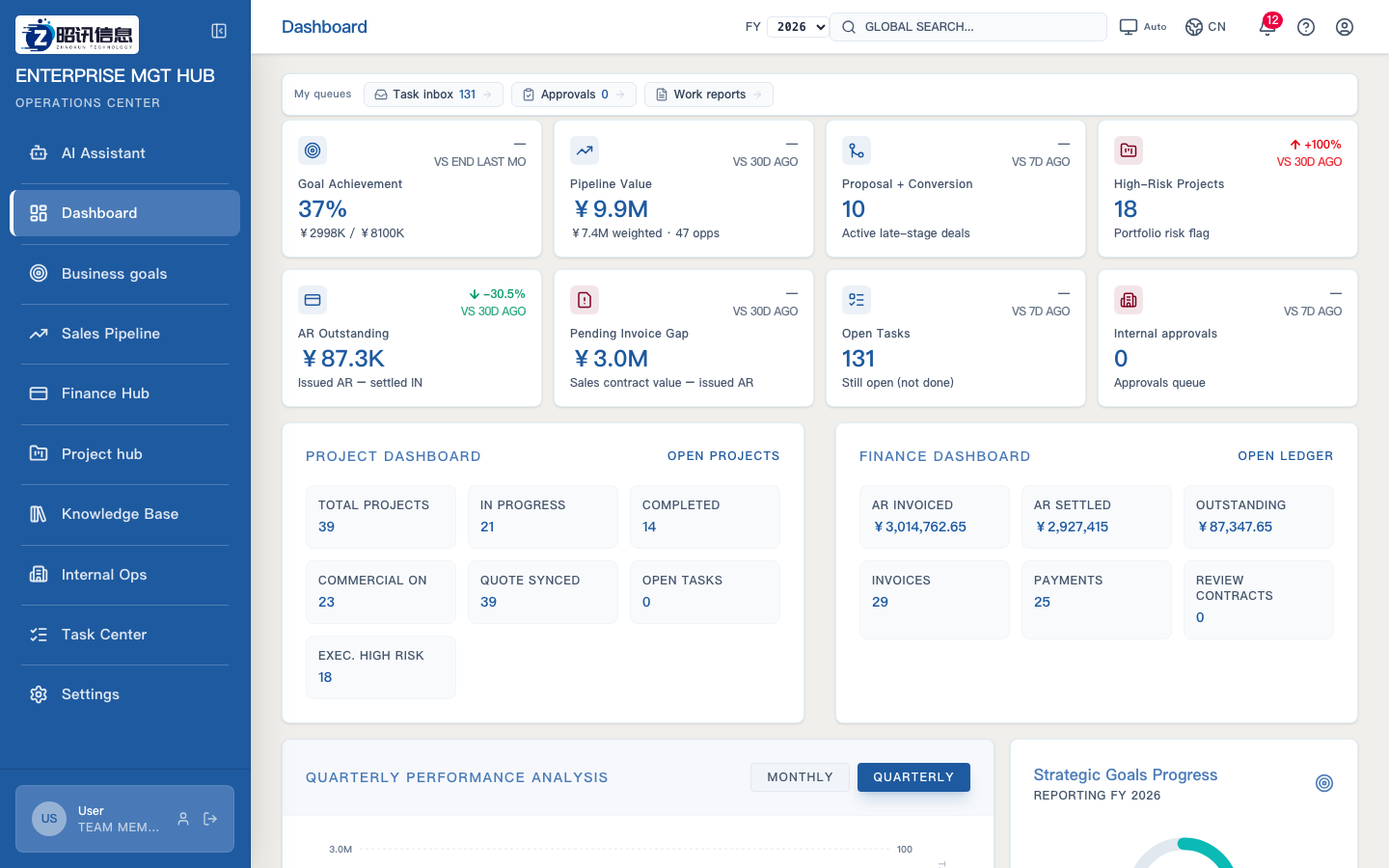
Executive Dashboard
KPI cards, project health, and the AI insight panel laid out on a single screen—at a glance you see which projects are healthy and which are flashing risk signals, then drop straight into the AI chat to dig deeper.
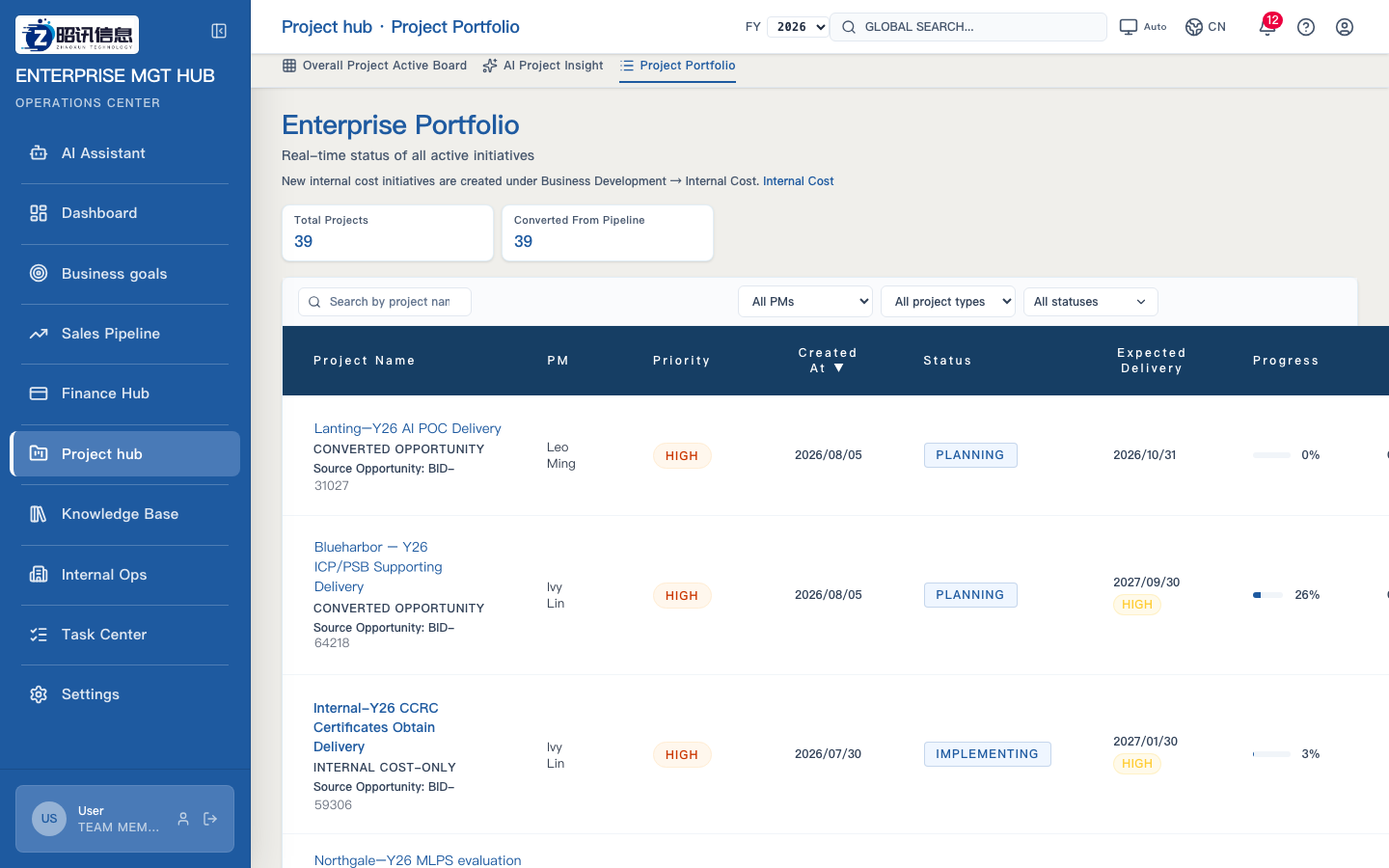
Project Center · Portfolio & Details
The project portfolio list consolidates every in-flight project, with drill-down into project details and task breakdowns. PMO inspections, reviews, and risk flagging all happen in one place.
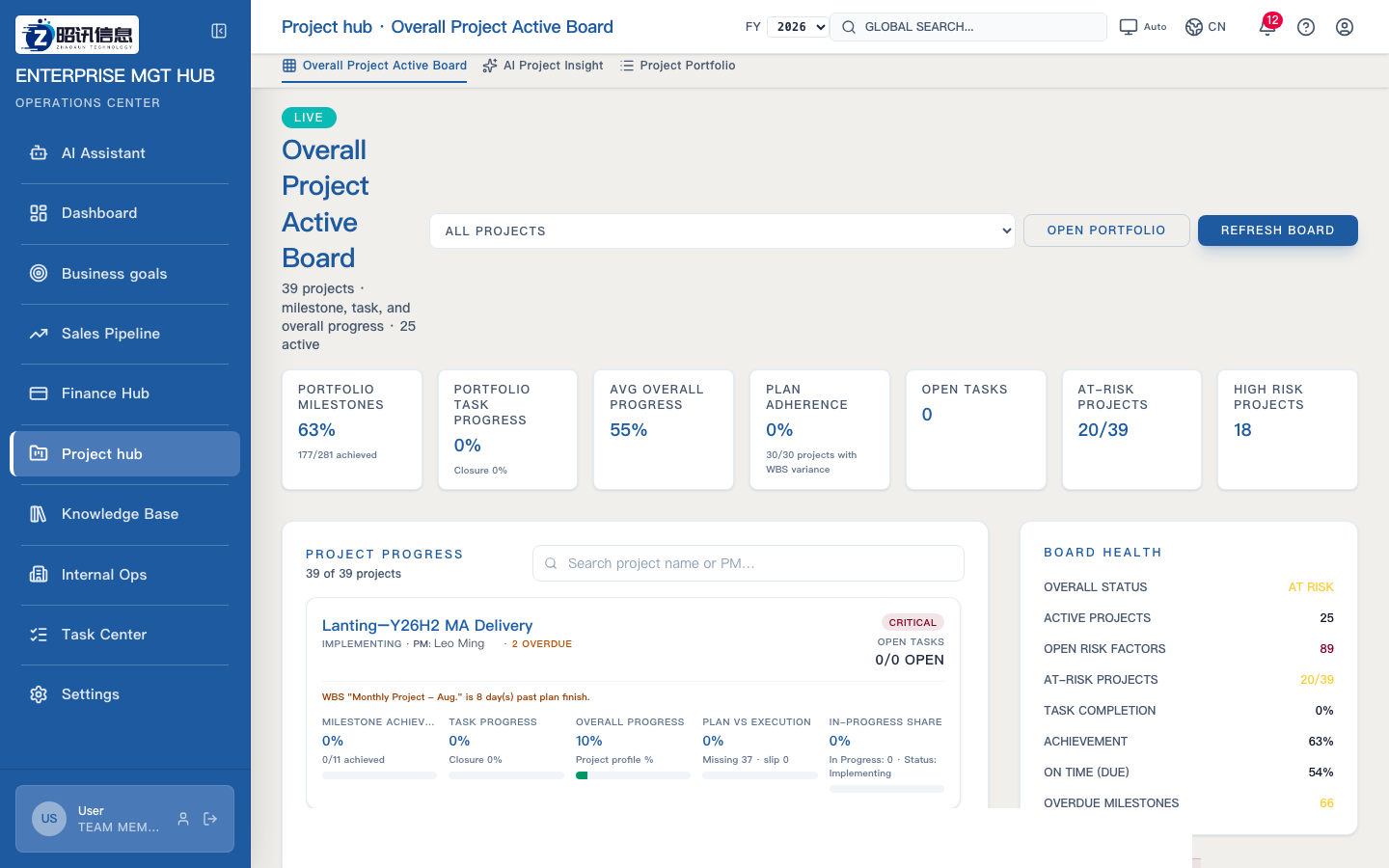
Active Task Board
Active tasks flow through a Kanban board, with due-date reminders triggered uniformly by the jobs-cron sidecar—who's doing what, and where things are stuck, is immediately clear.
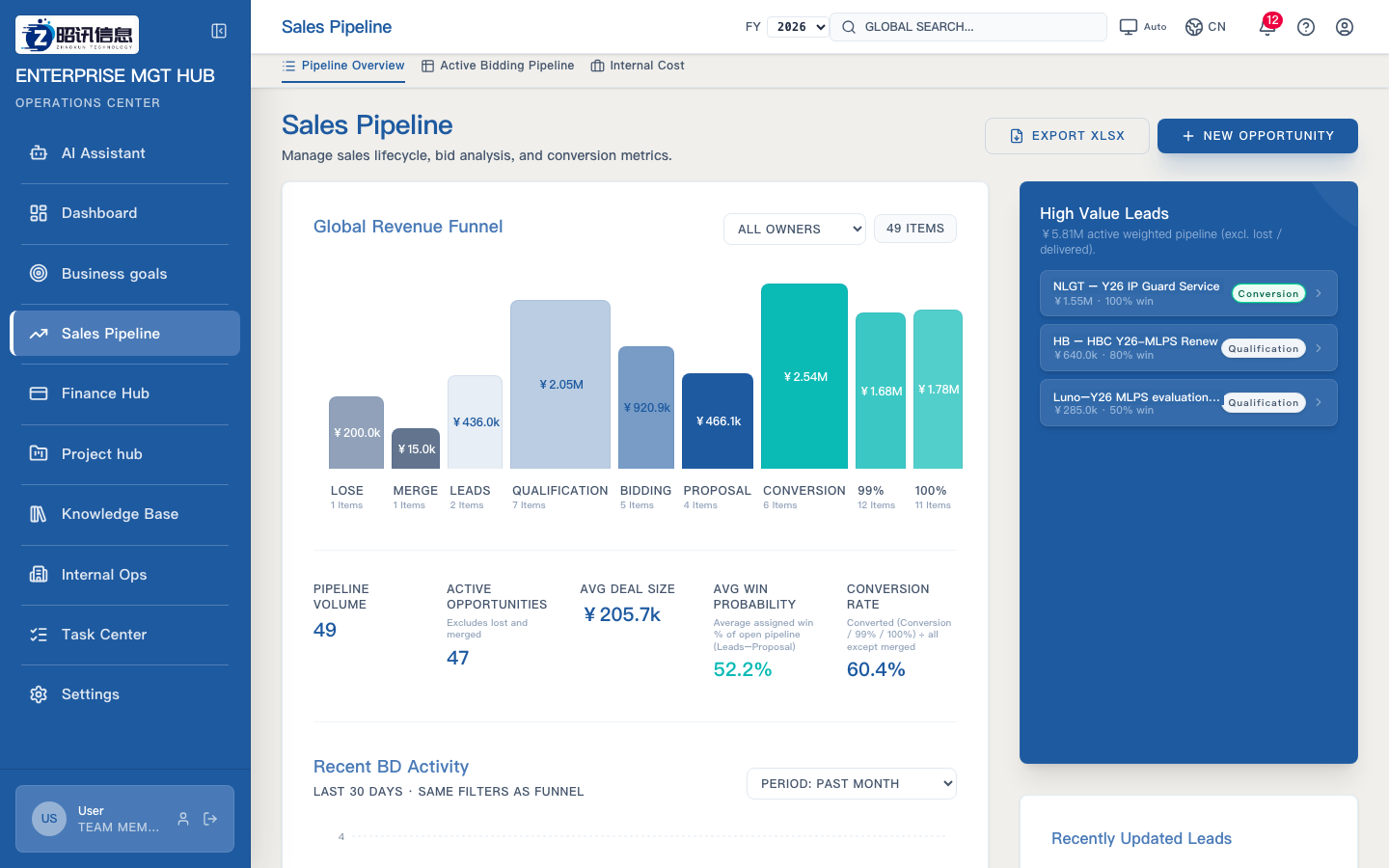
Business Development
Sales funnels and bidding pipelines displayed side by side; opportunity progress and bidding milestones are fully visible end-to-end, paired with the BD Quotation skill for fast customer response.
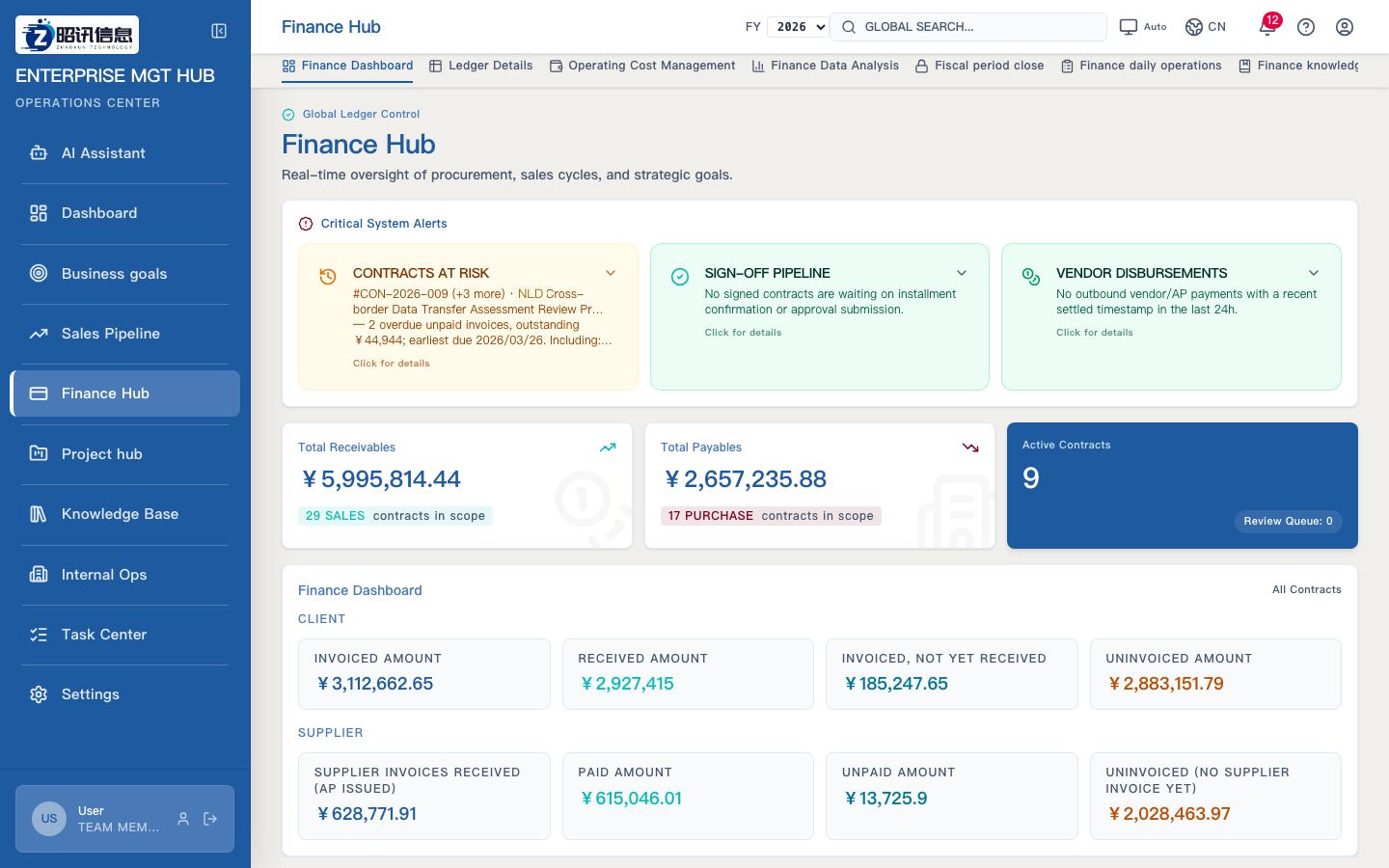
Finance & Contracts
Contract ledger and financial views are centralized and share a single source of truth with project and opportunity data—so business analysis no longer falls out of sync.
AI Built In, Capabilities On Demand
Calls /api/ai/insights/projects. The AI reads project-domain data and outputs a structured insights JSON—progress summary, risk list, and recommended actions—ready for the dashboard and weekly reports to consume directly.
Enterprise-Grade Foundation
More Than a Dashboard—A Foundation You Can Trust
RBAC & Settings Registry
Role-based menus, data, and action permissions; system settings managed centrally via a registry, with scope filtering applied down to the data layer.
Hover / tap to flip ↻Each role sees only its permitted menus and data views. All permission-related configuration is maintained centrally in the settings registry—contained, controlled, and resistant to drift.
Change Approval Flow
Key changes—project initiation, opportunity conversion, staffing—are executed as approval instances with full process and outcome logs.
Hover / tap to flip ↻Approvals share the same database as five-domain business data, cutting down on offline coordination and inconsistent interpretations—change history is always retrievable.
Dual-Track Backup & Restore
In-app zip import/export bundles business collections and uploaded files together; operations-grade full snapshots provide a second line of defense.
Hover / tap to flip ↻Export endpoints support three scopes—settings, data, and full—all gated by authentication; snapshots cover the data directory tree (including uploads).
Global Search
One search box across the whole system: from projects, contracts, and opportunities to system settings—anything visible can be retrieved instantly.
Hover / tap to flip ↻The search index keeps growing and now covers the settings registry, RBAC anchors, and the weekly-report inbox.
Operations-Friendly
One-Command Docker Compose, Lightweight Rollout
One-Command Compose Setup
A single command brings up four services—app, PostgreSQL, jobs-cron sidecar, and browser-fetch sidecar—environment ready in one go.
Plug in AI Middleware
Configure your model service on demand and turn on insight generation, streaming chat, and skill packs. Skipping the AI middleware does not affect the normal operation of the five-domain business.
Configure Permissions & Automation
Set up RBAC roles and approval flows; enable scheduled automations such as weekly report drafts and AI assistant reminders, all triggered uniformly by an external cron.
Roll Out to Your Team
Publish directly over your LAN. The built-in help center includes workflow guides, AI assistant docs, and a bilingual manual—so your team can self-onboard.
Why Choose EMH
From Spreadsheet Patchwork to an Executive Cockpit
Traditional Report Patchwork
- Excel assembled the night before every meeting—definitions drift, versions scattered everywhere
- Project, contract, and opportunity data scattered across systems—no shared view, numbers won't reconcile
- Risks tracked manually; issues only surface after the fact, with little audit trail for retrospectives
- Two hours hand-writing the weekly report—and the information is already a week stale
EMH Executive Cockpit
- Five-domain data on one screen—KPIs, project health, and AI insights unified
- Contract value, opportunity funnel, and project progress all share one definition and update together
- AI middleware proactively monitors risks, with full conversation and audit trails
- Ask AI in one sentence to draft your weekly report—review-meeting material on demand
FAQ
Top Questions Leaders Ask Before Rollout
Which roles is EMH designed for?
Primarily built for executives, PMOs, and operations leaders—executive reviews, project inspections, contract and opportunity reviews, and goal alignment all happen in one system. RBAC lets you open up the right data scopes to each role.
Does the AI require a large model to be plugged in?
No. The five-domain business functions work fully without AI. When you're ready, plug in the AI middleware to turn on project insights, streaming chat, proactive agents, and skill packs—swap models or disable them later without affecting business operations.
How are critical business changes governed?
Key changes—project initiation, opportunity conversion, staffing—don't take effect directly. Instead, approval instances are generated and processed, with records of who handled each step and the outcome. On top of that, every AI conversation is written to the ai_audit log, so who did what with AI and when is fully traceable.
How are data backup and migration handled?
Two-track safeguards: routine migration and admin operations use the in-app zip import/export, completed inside the system. Operations-grade full snapshots live outside the system and cover the full data directory (including uploads) as an independent safety net. Export endpoints let you choose scope on demand and require authentication—the two paths cover different frequencies and scenarios.
How is external system data ingested?
External systems can write data via inbound endpoints using an inbound token. Once integration sync is enabled, you can trigger Sync now for an immediate sync or schedule recurring syncs via cron. WeChat articles and similar content can be imported via the browser-fetch sidecar.
Are deployment and onboarding costly?
Deployment uses standard Docker Compose orchestration—no extra complex environment needed. Onboarding is supported by the built-in help center—workflow guides, AI assistant docs, sample prompts, and a bilingual README/manual are all in place, so your team can self-serve from the documentation.
Your Operations, On a Single Screen
Request a trial or schedule a demo. We'll walk you through five-domain data unification, AI insights, and scheduled automation in the context of your projects and contracts.